Goal & Project CANVA Planner Templates: Streamline Your Workflow
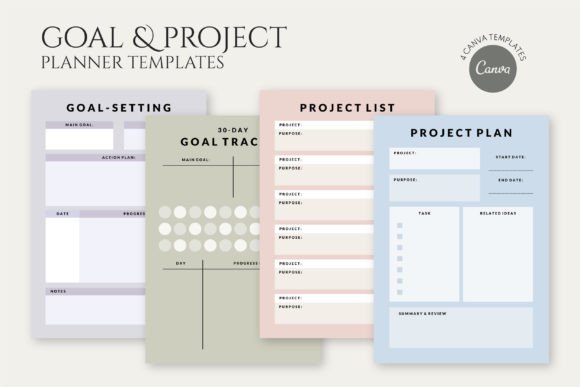
For designers, entrepreneurs, and content creators, the gap between a brilliant idea and a finished product often lies in the planning phase. We have all experienced the chaos of scattered notes, missed deadlines, and the mental load of trying to keep every detail organized. This is where the right system changes everything. The Goal & Project CANVA Planner Templates are not just digital paper; they are a structured framework designed to bring order to the creative and business chaos. This bundle includes four distinct templates: a comprehensive Goal-Setting planner, a focused 30-day Goal Tracker, a clear Project List, and a detailed Project Plan. Each one serves a specific purpose, working together to support your productivity from the initial vision to the final execution.
A Visual System Built for Clarity and Focus
The visual personality of these templates is intentionally minimalist and professional. They avoid decorative distractions, instead using a clean layout, ample white space, and a restrained color palette. This approach is not about being plain; it is about reducing cognitive load. When you open a template, your eyes are guided directly to the content sections—tasks, deadlines, milestones—without fighting for attention. The style leans modern, using clean sans serif typography for headings and body text, which ensures readability on screens and in print. This visual consistency across all four templates creates a unified brand identity for your personal or business planning system, making it feel cohesive and professional.
The appeal lies in its adaptability. Think of these templates as a high-quality design asset. They provide the visual hierarchy and structure you need, but they are a blank canvas for your content. A social media manager might use the Project Plan template to map out a campaign launch, while a crafter could use the 30-day Goal Tracker to monitor inventory for a market. The modern typography and clean lines ensure that whether you are a brand strategist presenting a client roadmap or a blogger planning content, the output looks polished and intentional.
Practical Applications Across Creative and Business Projects
The true value of the Goal & Project CANVA Planner Templates is revealed in their real-world application. Here is how different professionals can leverage them:
- Entrepreneurs and Small Business Owners: Use the Goal-Setting template to define quarterly objectives. Break these down into actionable steps with the Project List. Track daily progress on key initiatives using the 30-day Goal Tracker, creating a visual record of momentum that is incredibly motivating.
- Designers and Marketers: The Project Plan template is ideal for outlining deliverables, timelines, and client approvals for a new logo design or packaging design project. The Project List can serve as a master inventory of all active client work, preventing anything from slipping through the cracks.
- Content Creators and Bloggers: Plan an editorial calendar using the Project Plan. Use the Goal-Setting template to define audience growth or content production goals. The 30-day tracker is perfect for a content challenge or tracking engagement metrics after a new series launches.
- Publishers and Hobbyists: For managing a book launch or a large craft project, these templates provide the professionalism of a project management tool. The clear structure helps in communicating timelines with collaborators or simply maintaining personal accountability.
The templates influence more than just organization; they impact brand perception. Using a consistent, well-designed planning system internally can lead to more consistent external outputs. It fosters a sense of professionalism and attention to detail that clients and audiences notice, even if indirectly. The readability of the plans you create—whether shared with a team or kept for yourself—directly affects how well the information is understood and acted upon.
Integrating Templates into Your Creative Process
Getting started with the Goal & Project CANVA Planner Templates is straightforward. Upon purchase, you receive a ZIP file containing a PDF with clear instructions for accessing and using the templates in Canva. This is where the 100% fully customizable nature becomes your greatest tool. You are not locked into a rigid format.
- Evaluate Your Project Needs: Before diving in, clarify what you are planning. Is it a long-term vision (Goal-Setting), a short-term sprint (30-day Tracker), or a multi-faceted initiative (Project Plan)? Choosing the right template for the task is the first step to efficiency.
- Customize for Your Workflow: In Canva, you can easily change colors to match your brand identity, adjust fonts if you have specific brand guidelines, and add or remove sections. If you work better with bullet points than numbered lists, edit the template. This is about creating a system that works for you.
- Consider Font Pairings and Readability: The templates use standard, readable fonts. If you choose to modify them, remember the principles of font pairing. A sans serif body font paired with a serif heading can create a classic look, while two complementary sans serifs can feel very modern. Always prioritize readability over decorative flair for planning documents.
- Test and Iterate: Use the template for one project. At the end, ask: Did this help me stay on track? Was the layout intuitive? Did it save me time? The flexibility of the digital format means you can tweak it for the next project. This iterative process is key to developing a personal productivity system that genuinely enhances your work.
Ultimately, these templates are a creative font of structure in a often-unstructured creative world. They provide the scaffolding that allows your ideas to be built systematically. By incorporating the Goal & Project CANVA Planner Templates into your routine, you invest in a process that supports clarity, accountability, and the professional execution of your goals, no matter the scale of your ambition.