Master Your Brand Colors with Color Palette Canva Templates
Have you ever looked at a competitor's Instagram feed or website and felt a pang of professional envy? Everything seems to click together. Their social media graphics, their product photos, even their email headers all feel like they belong to the same family. That seamless visual experience isn't accidental; it’s the result of a disciplined approach to color. A well-defined color palette is the silent workhorse of a successful brand identity. It’s what makes a brand instantly recognizable in a crowded digital space and what builds that crucial sense of trust and professionalism over time. Yet, for many entrepreneurs and creators, the process of defining and maintaining that palette feels daunting. This is where a practical tool like a Color Palette Canva Template becomes less of a luxury and more of a fundamental design asset.
What Exactly Is a Color Palette Canva Template?
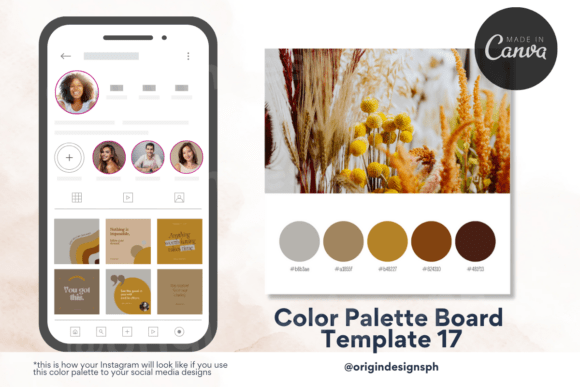
Think of it not as a rigid set of rules, but as a dynamic, interactive mood board for your brand's color story. A Color Palette Canva Template is a pre-designed, editable file within the Canva platform that serves as a central repository for your chosen colors. At its core, it’s a visual reference guide. You’ll typically see your primary, secondary, and accent colors displayed prominently, often with their specific hex codes (the six-digit codes that define a color digitally, like #FF6347 for tomato red) clearly listed. The template’s personality is one of clarity and utility. Its style is clean and modern, designed to present information without distraction, allowing the colors themselves to be the stars. The overall appeal lies in its simplicity and immediate practicality. Instead of hunting through old files or trying to remember if that blue was #0077B6 or #0096C7, you have a single source of truth you can reference with one click in Canva.
The visual characteristics of a good template are intentionally minimalist. It uses ample white space to let your palette breathe and employs a simple, legible sans serif font for the hex codes and labels. This isn't about elaborate graphic design; it's about creating a functional tool. You might find sections for color inspiration, space for notes on usage (e.g., "Use 'Forest Green' for headings only"), or even simple mockups showing the palette applied to a logo, a social media post, and a business card. This transforms the template from a static image into a living part of your brand’s design system.
Where This Template Fits Into Your Creative Workflow
The true power of a Color Palette Canva Template is its versatility across nearly every project you undertake. For the entrepreneur building a brand from the ground up, it’s the first step after choosing a name. It becomes the foundation for your logo design, ensuring the mark you create is built on a harmonious and intentional color scheme. When you move into web design, having this palette at your fingertips ensures your website’s buttons, links, and accent graphics maintain perfect consistency, reinforcing brand recognition with every scroll.
For social media managers and content creators, consistency is the daily battle. This template is your secret weapon. When creating social media graphics in Canva, you can quickly refer to your board to pick the exact shade for a call-to-action button or a text highlight. This eliminates the guesswork and prevents the subtle, brand-eroding shifts in color that happen when you eyeball a shade from a photo. The result is a cohesive feed that looks professional and intentional. It’s equally vital for editorial design, like creating a consistent look for a blog or a digital magazine, and for packaging design, where color often dictates a product's shelf appeal and communicates its personality at a glance.
The Strategic Impact on Your Brand and Audience
Choosing a Color Palette Canva Template is a practical decision with strategic consequences that ripple through your entire brand perception. First, it directly impacts visual hierarchy. By defining which colors are for headlines, which are for body text, and which are for interactive elements, you guide your audience’s eye exactly where you want it to go. A bold accent color on a "Shop Now" button, for example, naturally draws attention and can significantly improve engagement.
Second, it enforces brand consistency. This is perhaps its most critical function. When a customer sees your Instagram ad, clicks through to your website, and later receives an email, the consistent use of color creates a seamless journey. This repetition builds brand recognition—they start to associate those specific hues with your business, even before they read a word. This is the bedrock of a strong brand identity. Over time, this consistency translates into professionalism. A brand that looks put-together is perceived as more trustworthy and credible. It signals that you care about the details, which can influence a customer's decision to choose you over a competitor with a more disjointed visual presence.
Practical Guidance for Using Your Palette Template
Simply purchasing or downloading a template isn’t the end goal; integrating it into your process is. Here’s how to make it work for you. First, choose your template based on your needs. Do you need just a simple board with hex codes, or one that includes mockups for social media graphics and logo design? Consider the included styles. A robust template might offer variations for light and dark backgrounds.
Next, evaluate the project fit. Use the template to test font pairings. Place your chosen sans serif font next to your secondary color. Does it remain readable? If you’re using a script font or handwritten font for accents, does it contrast enough with your background color to be legible? Readability is non-negotiable. A beautiful premium font or creative font is useless if it strains the eyes. This is where you apply modern typography principles—ensuring enough contrast and appropriate sizing for your primary channels, whether that’s print or web.
Finally, use the template to maintain your system. When you hire a new freelance designer or work with a virtual assistant, share the Canva template link. It becomes your commercial font and color guide, ensuring anyone creating assets for you stays on-brand. It’s a living document. As your brand evolves, you can update the template, adding new approved colors or retiring ones, ensuring your entire team is always working from the most current version of your brand’s visual language.