Gorilla on Different Product Templates: A Creative Clip Art Guide
When you are building a brand or launching a new merchandise line, the visual identity needs to do more than just look good; it needs to perform. This is where Gorilla on Different Product Templates steps in. It isn’t just a single static image; it is a versatile digital clip art system designed specifically for creators who need flexibility. We are talking about a hand-drawn sketch style that carries a distinct personality—raw, artistic, and tactile—while being built on a foundation of professional vector technology. Whether you are a small business owner looking to print t-shirts or a graphic designer working on a complex scrapbooking layout, understanding how to leverage this asset is key to maximizing your return on investment.
The Aesthetic Appeal of the Hand-Drawn Sketch
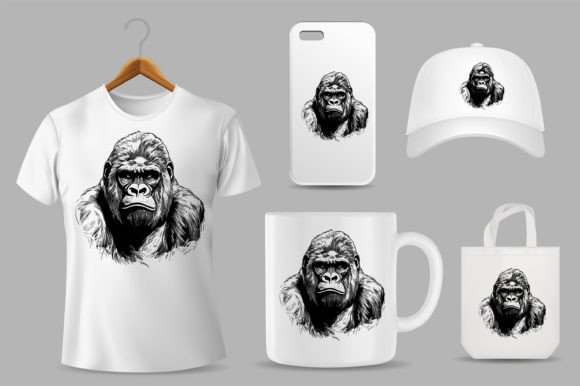
The core visual characteristic of this collection is its hand-drawn sketch gorilla illustration style. In a digital world saturated with clean, sterile sans serif font designs and perfect geometric shapes, there is a growing hunger for texture and imperfection. This illustration style delivers that organic feel. It mimics the look of charcoal or ink on paper, offering a level of authenticity that resonates with audiences who value craftsmanship.
This "imperfect" perfection is a powerful tool in brand identity. It suggests that a brand is approachable, creative, and perhaps a bit rebellious. The visual weight of a gorilla—symbolizing strength, leadership, and intelligence—combined with the softness of a sketch creates a compelling contrast. It works beautifully as a counterpoint to modern typography. For instance, pairing this illustration with a bold serif font can create a vintage aesthetic, while combining it with a clean modern typography style can make the sketch pop as a focal point in editorial design or packaging design.
Technical Precision: Why 100% Vector Matters
It is easy to get caught up in the artistic side of design, but the technical specs of Gorilla on Different Product Templates are what make it a viable commercial asset. The files are delivered in EPS format and built with 100% vector shapes. For the uninitiated, vectors are mathematical equations rather than pixels. This means you can scale the gorilla illustration to the size of a postage stamp or the side of a van without losing a single ounce of quality.
The specifications are tailored for professional production:
- Adobe Illustrator CC Version: Ensures compatibility with current industry-standard software.
- 300 DPI: While vectors are resolution-independent, this high-DPI setup ensures that if you rasterize elements for specific digital contexts, the detail remains crisp.
- 100% Print Ready: This is crucial for merchandise. You don’t want to deal with color separation issues or bleed errors when sending files to a printer for canvas or clothes printing.
- 100% Color Changeable: You are not locked into a black-and-white sketch. You can adapt the colors to match specific brand identity guidelines instantly.
This level of editability is essential for logo design and social media graphics. You might need a monochrome version for a watermark and a full-color version for an Instagram post. Because the file is easy to edit, you have total control over the final output, ensuring consistency across all platforms.
Practical Applications: From Digital to Physical
The true value of Gorilla on Different Product Templates lies in its adaptability across different mediums. It is not limited to one specific niche; it functions as a robust piece of design assets inventory.
Merchandise and Apparel
For the entrepreneur, this asset is ready-made for clothes printing. The hand-drawn aesthetic is particularly popular in streetwear and indie apparel right now. Because the file is 100% print ready, the workflow from design to production is streamlined. You can apply the design to t-shirts, hoodies, and tote bags. It also works exceptionally well for engraving on wood or leather goods, where the "sketch" lines translate beautifully into etched textures.
Digital Content and Web Design
In the realm of web design, a heavy illustration can sometimes slow down a site or clash with UI elements. However, because you can change the colors and simplify the vector, this gorilla illustration can serve as a unique hero image or a subtle background pattern. It adds a layer of depth to a landing page that stock photography simply cannot match. For social media graphics, the illustration provides a scroll-stopping visual that feels bespoke rather than generic.
Crafting and Hobbies
For the hobbyist, scrapbooking, and printable decoration markets, this file opens up creative possibilities. The sketch style fits perfectly with the "maker" movement. You can print the illustration onto sticker paper, use it for card making, or incorporate it into mixed-media art projects. The vector nature ensures that even small details remain sharp when printed on home printers.
Strategic Integration: Font Pairing and Visual Hierarchy
Using a premium font or a creative font alongside this illustration requires a bit of strategy. Because the gorilla is a detailed, hand-drawn element, it acts as a high-contrast visual anchor. If you pair it with an overly ornate script font or a complex handwritten font, the design can become cluttered and difficult to read.
Instead, consider the principles of visual hierarchy:
- The Focal Point: Let the Gorilla illustration be the primary visual. Its texture and form will draw the eye first.
- The Typography: Use a clean, legible typeface for your messaging. A geometric sans serif font often works best here, providing a clean canvas that allows the sketch to breathe.
- Color Harmony: Use the "100% Color Changeable" feature to ensure the illustration harmonizes with your text. If your brand palette is muted earth tones, recolor the sketch to match.
This approach ensures that your design remains professional. It prevents the "ransom note" effect where too many competing styles fight for attention. By treating the Gorilla illustration as a piece of modern typography art—where the image acts as a letterform or a logo mark—you create a cohesive composition that enhances brand perception.
Evaluating Project Fit and Licensing
Before integrating Gorilla on Different Product Templates into a commercial workflow, it is vital to evaluate the project fit. This style is bold and artistic. It is perfect for brands that want to convey creativity, strength, or an "indie" vibe. It might be less suitable for strictly corporate environments like law firms or financial institutions, where a more conservative serif font and photography are expected.
When working with clients, present the asset in context. Show them how the sketch looks on a mockup of a canvas bag or a business card. This helps bridge the gap between a digital file and a tangible product. Always review the licensing to ensure that your specific use case—whether it is for a client’s logo design or mass-produced merchandise—is covered.
Ultimately, this collection is a tool for expression. It bridges the gap between the raw energy of a sketch and the precision of digital vector art. By utilizing its high-resolution, editable features, you can create professional, engaging designs that stand out in a crowded marketplace. It is not just about placing a picture on a template; it is about using a versatile design asset to tell a story.