Designing with PSD Layered Stripe Paper Templates: A Creative Guide
Stripes are one of the most enduring and versatile patterns in visual design. They evoke a sense of rhythm, order, and classic style, from the bold lines of a sailor's shirt to the sophisticated pinstripes of a business suit. For digital creators, having a reliable and customizable source for high-quality stripe patterns is essential. The PSD Layered Stripe Paper Templates set provides exactly that: a professional foundation for generating your own unique digital backgrounds. This commercial use collection is built for designers, crafters, and entrepreneurs who need to produce consistent, high-resolution assets for a wide range of projects.
What Exactly Are These Layered Templates?
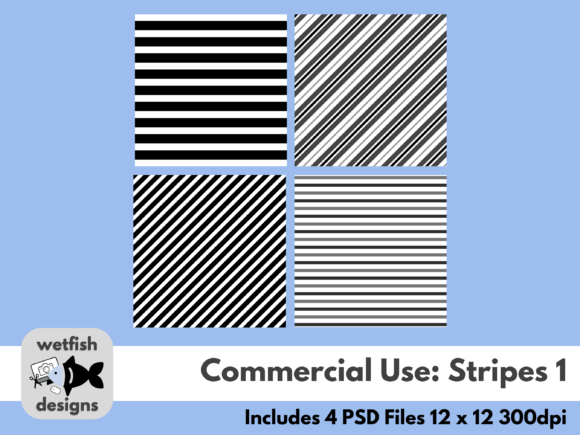
At its core, this product is a set of four Adobe Photoshop (.PSD) files. Each file is a meticulously crafted template where the stripes are not a single, flat image. Instead, they are constructed on separate, editable layers. This layered structure is the key to its power. You aren't just buying a static stripe paper; you're acquiring a dynamic design tool. The templates are saved at 300 dots per inch (dpi), making them suitable for both high-quality digital use and professional print projects. The package description clearly states that texture files are not included, which is a practical consideration. This keeps the templates clean and lightweight, allowing you to apply your own textures or use them as-is for a crisp, modern look. The real value lies in the ability to change colors with a few clicks, offering what the creator rightly calls "limitless possibilities."
Step One: Color Selection and Brand Alignment
The first and most impactful step is choosing your colors. This is where the PSD Layered Stripe Paper Templates transition from a generic asset to a core component of your brand identity. Open a template in Photoshop, select a stripe layer, and apply a new color overlay or fill. You can match your exact brand hex codes, creating backgrounds that are perfectly aligned with your existing logo design and marketing materials. For a seasonal campaign, you might choose warm, autumnal tones. For a tech blog, a cool, monochromatic blue palette could establish a sleek, professional feel. This level of control ensures visual consistency across all your design assets.
Step Two: Layer Manipulation and Pattern Variation
Beyond color, the layered nature allows for deeper customization. You can adjust the opacity of individual stripe layers to create subtle, watercolor-like effects. By toggling layers on or off, you can change the density and rhythm of the pattern within the same file. This is incredibly useful for creating a coordinated set of backgrounds that vary slightly but remain visually related—perfect for a series of social media posts, a multi-page digital scrapbook, or a set of cohesive product mockups.
Step Three: Applying Texture and Final Polish
While the templates are clean, adding texture can dramatically alter their personality. A subtle paper grain or a linen texture applied via a clipping mask can give your stripes a tactile, handmade quality ideal for paper crafts and scrapbooking. A grunge overlay can lend an edgy, urban feel suitable for music posters or streetwear branding. This step is where you infuse the template with your unique creative voice, transforming it from a digital pattern into a piece of custom art.
Practical Applications Across Industries
The utility of these templates spans numerous fields. Here’s how different professionals can leverage them:
- Digital Scrapbooking and Paper Crafts: This is the most direct application. Create custom background papers for layouts, card making, and album design. The ability to match colors to photos or themes is invaluable.
- Web Design and UI: Use subtle, low-opacity stripes as website backgrounds, section dividers, or button textures. They add visual interest without overwhelming content, contributing to a clean and modern typography hierarchy.
- Marketing and Social Media Graphics: Design eye-catching backgrounds for Instagram stories, Facebook ads, Pinterest pins, and email headers. Consistent use of your brand stripes can boost recognition and professionalism.
- Editorial and Packaging Design: In editorial design, stripes can frame pull quotes or create dynamic chapter openers. For packaging design, a custom stripe pattern can become a distinctive brand element on boxes, labels, and shopping bags.
- Entrepreneurs and Small Business Owners: Create cohesive materials on a budget. Design your own stationery, business cards, thank-you notes, and promotional flyers with backgrounds that look custom-made, reinforcing a polished brand image.
Design Principles in Action: Why Stripes Work
From a design perspective, stripes are powerful because they guide the eye and create structure. Horizontal stripes can make a space feel wider and more stable, while vertical stripes add a sense of height and formality. The spacing between stripes—their weight and rhythm—contributes to the overall visual hierarchy. A template with thick, bold stripes makes a confident, graphic statement. A template with fine, delicate pinstripes suggests sophistication and nuance. By having multiple PSD templates in a set, you have a range of these rhythmic options at your disposal.
When integrating these backgrounds with other design elements, consider font pairing. A bold, geometric stripe pattern pairs well with a clean sans serif font for a modern, assertive look. A more classic, evenly spaced stripe might complement an elegant serif font for a timeless feel. The key is to ensure the background pattern doesn't compete with your primary content for attention; it should support it. This is where testing and adjusting opacity becomes a critical part of the process.
Evaluating Fit and Final Considerations
Before purchasing any commercial font or design asset, it's wise to evaluate its fit for your typical projects. Consider the file format compatibility—these are PSD files, requiring Adobe Photoshop or a compatible editor. Think about the aesthetic range you need. Does the set offer enough variation in stripe width and style? The provided set includes four templates, which is a solid starting point for building a pattern library.
Regarding licensing, the term "commercial use" is crucial. Always review the specific license agreement included with the download. A standard commercial license typically allows you to use the assets in projects you sell (like printed invitations, digital scrapbook kits, or merchandise) but prohibits reselling the template files themselves. Understanding this ensures you use the design assets ethically and legally.
Ultimately, the PSD Layered Stripe Paper Templates are less about the stripes themselves and more about the control and creativity they unlock. They are a professional shortcut to custom pattern creation, saving hours of manual work while delivering high-quality, versatile results. For anyone regularly producing digital or print materials, they are a practical and valuable addition to a creative toolkit.